

Manga MTL Translator for manga pages and panels
Upload pages you own or may use (PNG, JPG, WebP, HEIC or a ZIP), choose the source and target language, and get a translated image of each page back. 0.1 credits per translated image.
Only translate images you own, made, licensed, or have permission to work with.
Sample result
Drag the slider to compare the source page with the translated image. The source is a page of vertical Japanese text from a public-domain book, not a manga page.
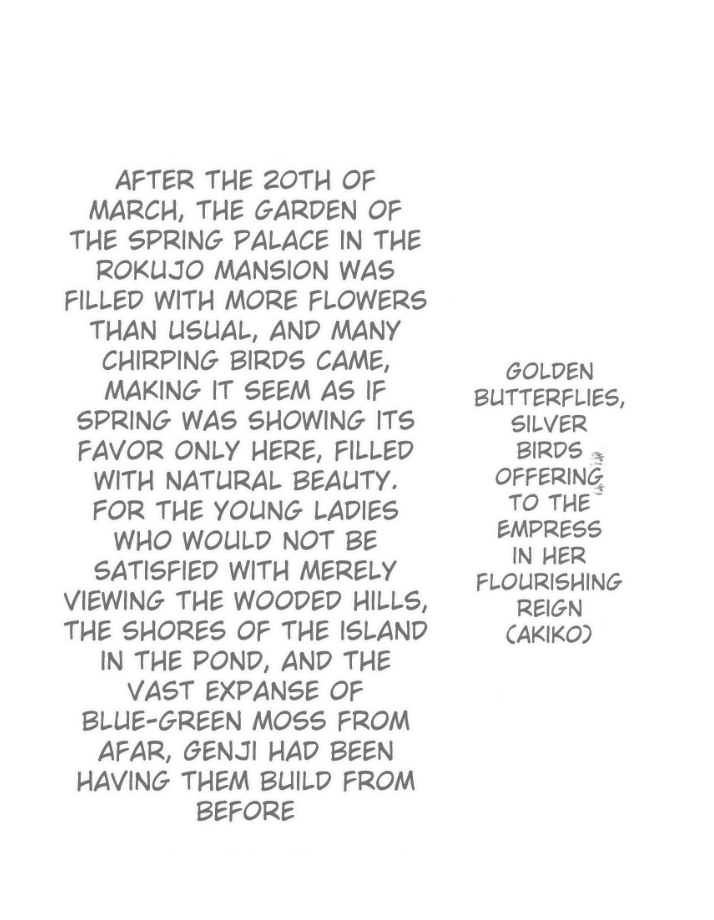
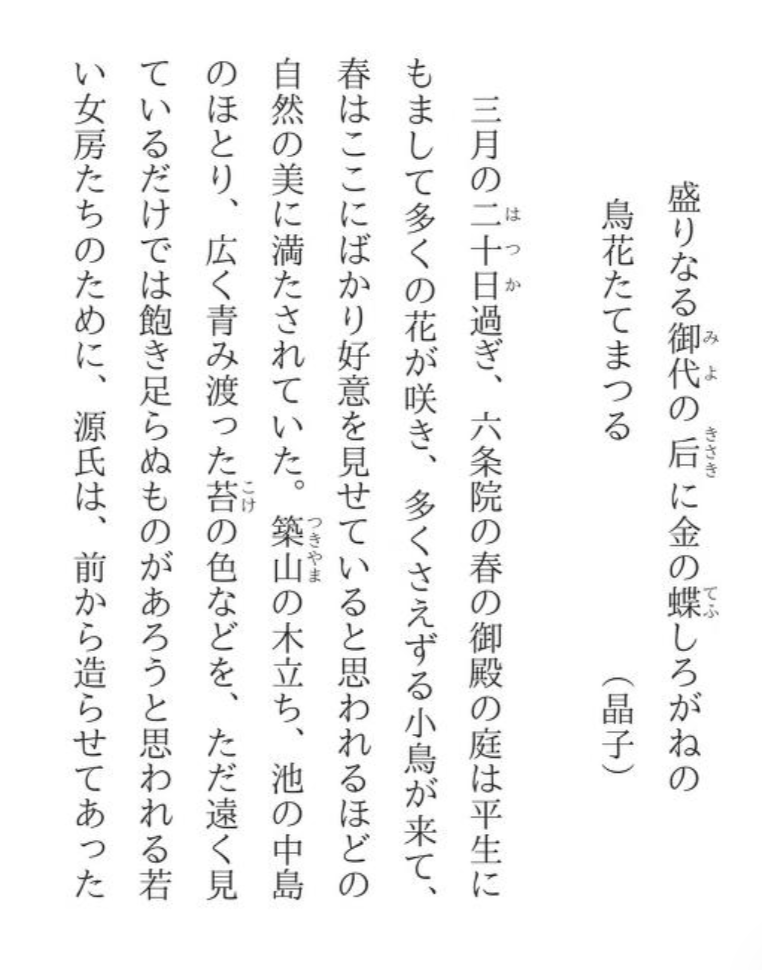
Vertical Japanese → English. Text: Yosano Akiko's modern Japanese Tale of Genji, chapter Kochō (public domain).
How to MTL manga pages you already have
Use this page for raw manga pages you own or may use, for example scans of your own volumes or your own art. Novel Translator does not supply manga, scans or chapters. Here is what the image translator does and what to check.
Bring images or a ZIP
Upload PNG, JPG, WebP or HEIC images (HEIC is converted to JPEG), or one ZIP file that contains them. The upload page re-encodes each image, and an image that is still over 10 MB after that is rejected.
Images longer than 2400 px on the long edge are scaled down before upload. A normal manga page (about 1000 × 1500 px) is not scaled down.
Pages keep the order in which they arrive. For a ZIP, that is the order of the files inside the archive, so name them 001.jpg, 002.jpg and so on, and check the order in the folder before you translate.
Pick the source language
Choose Japanese, Korean, Simplified Chinese, Traditional Chinese or one of 25 other languages. There is no auto detect, so choose the language that is on the page.
The sample above shows a page of vertical Japanese text translated into English.
What you get back
Each page is sent through our server to an image translation service, which returns a new image of the page with the translated text. Our server does not keep your original, which stays in your browser. Each translated page is saved in your browser and, when the folder was created with cloud sync (the default when you are signed in), also in your account's storage.
Translate the first few pages and read them before you run a whole chapter. Small, faint or hand-lettered text is the most likely to be missed.
Names and terms: there is no glossary for images
The image translator takes only the source and target language. You cannot add a glossary or instructions, so a name can be spelled one way on one page and another way on the next.
Honorifics such as -san or senpai can be kept, translated or dropped. If you read a light novel rather than a manga, use the text translator for EPUB and TXT files: it has a glossary for names and terms.
Read and download
Keep each chapter in its own folder and read it in page mode or scroll mode. Download one page, or the whole chapter as a CBZ file (a ZIP of numbered pages that most comic readers open).
Cost
Each translated image costs 0.1 credits. A page that fails is not charged. You need to sign in to upload.
What Manga MTL Translator does with manga pages and panels
Built for comic pages and other images with text that you have the right to use. Here is what it does, checked against the product.
Translated page images
Each page comes back as a new image with the translated text. Check small, faint or hand-lettered text: it is the most likely to be missed.
29 source languages
Japanese, Korean, Simplified and Traditional Chinese, English, Arabic, Russian, Thai, Vietnamese and others. Choose the source language yourself: there is no auto detect.
A whole chapter at once
Upload separate images or one ZIP file. Pages are translated three at a time on a computer and one at a time on a phone.
Folders and a reader
Keep each chapter in a folder and read it in page mode or scroll mode.
Pay for finished pages only
Each translated image costs 0.1 credits. A page that fails is not charged.
Download pages or a CBZ
Save one page, or the whole chapter as a CBZ file that most comic readers open.
Common Questions About manga machine translation
What you need to know before you MTL translate manga:
What types of images can Manga MTL Translator translate?
Images you own, made, licensed, or have permission to work with, including comic pages, panels, screenshots and scanned pages. Novel Translator does not provide images, scans or comics.
What file sizes work?
PNG, JPG, WebP and HEIC images, or a ZIP of them. The upload page scales each image down until its long edge is at most 2400 px and re-encodes it. An image that is still over 10 MB after that is rejected. Cut long webtoon strips into parts of at most 2400 px high first, or the text becomes too small to read.
Where do my images go?
To translate a page, the image is sent through our server to an image translation service, which returns the translated image. Our server does not keep your original, which stays in your browser. Each translated page is saved in your browser and, when the folder was created with cloud sync (the default when you are signed in), also in your account's storage.
Can I add a glossary for names?
Not for images. The image translator takes only the source and target language, so check names across pages. For novels in EPUB or TXT, the text translator has a glossary.
How much does it cost to MTL translate manga?
Each translated image costs 0.1 credits, and a page that fails is not charged. You need to sign in to upload.
Language-Specific Translators
Japanese to English Manga Translator
Translate Japanese manga to English from images. Handles kanji, hiragana, katakana OCR, honorifics, onomatopoeia, and right-to-left panel layouts. Use images you have permission to work with.
Japanese to Korean Manga Translator | 일본 만화 한국어 번역기
Translate Japanese manga to Korean with image translation. Handles honorific-to-speech-level mapping, onomatopoeia, and SOV grammar similarities. 일본 만화를 한국어로 자동 번역하세요. 경어 변환, 의성어·의태어, SOV 문법 유사성을 활용한 정확한 번역을 제공합니다. Use images you have permission to work with.
English to Japanese Manga Translator | 英語の漫画を日本語に翻訳
Translate English comics and manga to Japanese. Handles SVO-to-SOV restructuring, honorific insertion, and natural Japanese dialogue generation. 英語の漫画やコミックを自然な日本語へ翻訳。語順の組み替え、敬語の付加、擬音語の拡張まで対応できます。 Use images you have permission to work with.
Japanese to Chinese Manga Translator | 日语漫画翻译为中文
Translate Japanese manga images to Chinese when you have permission to work with them. 将日语漫画图片翻译为中文,支持共用汉字处理、敬语转换、SOV到SVO语序调整及拟声词本地化。
Start with an image you can use
Upload an image you own, made, licensed, or have permission to translate. Novel Translator does not provide images, scans, comics, or source files.